

Domain
Domain Renewal Phishing Emails: A Singapore Business Guide
Received an unexpected domain renewal or monitoring invoice? Pause before paying. A message that knows your website address and company name is not necessarily from your hosting provider. A paid renewal notification service is not the same as renewing your domain registration.
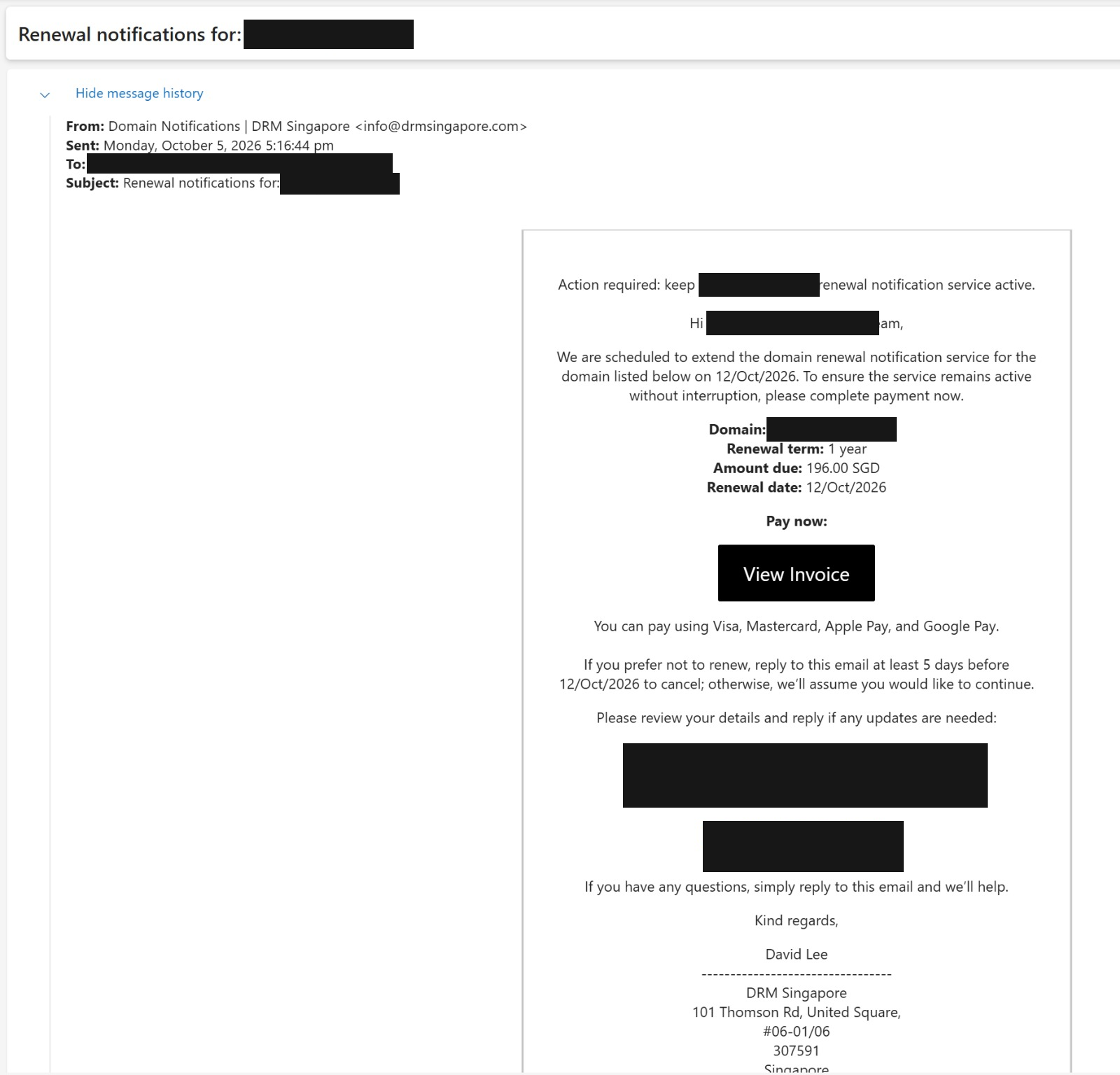
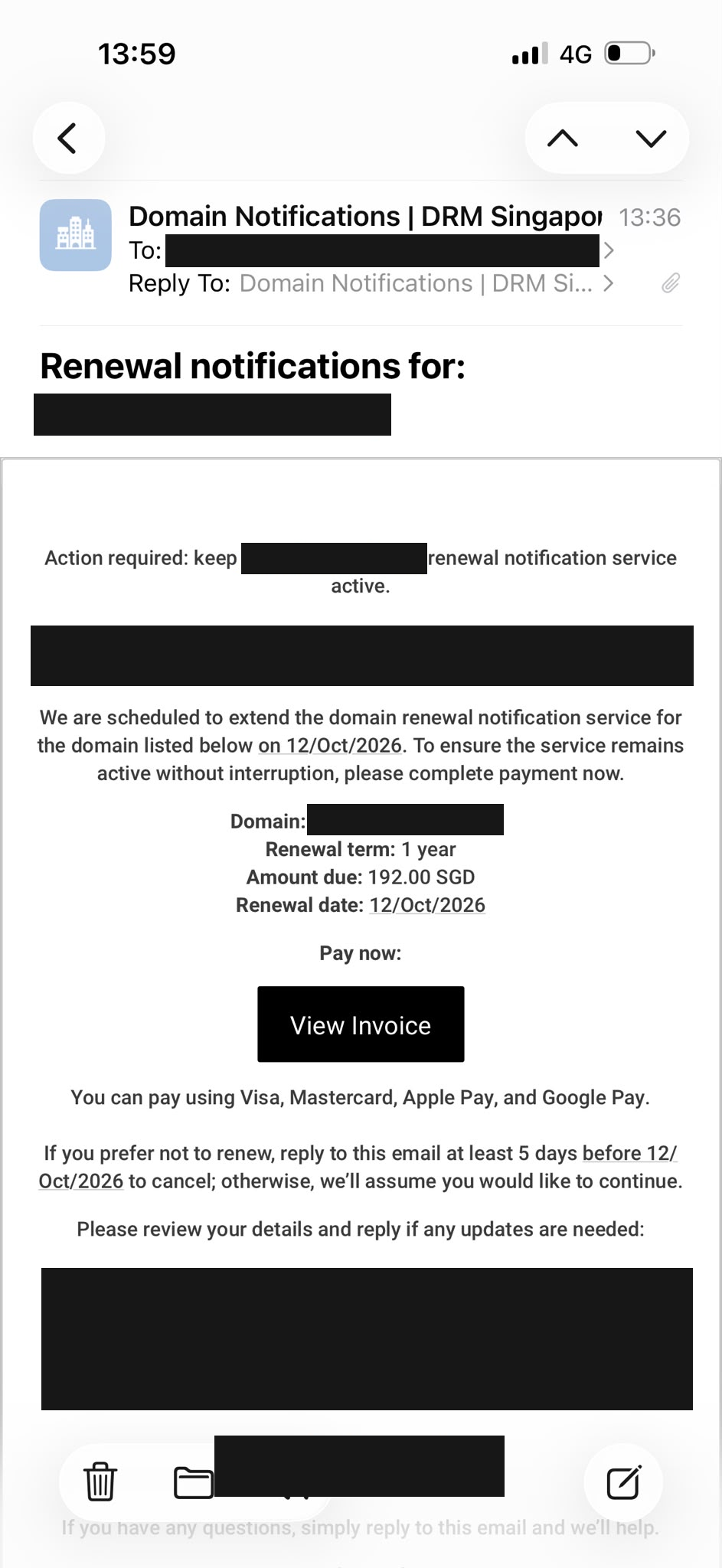
QUAPE customers have shared two concerning emails displaying the sender name “Domain Notifications | DRM Singapore”. We explain the warning signs below using screenshots with customer information permanently redacted. These messages should not be treated as QUAPE invoices.
The quick rule for QUAPE customers
For services purchased from QUAPE, pay only an invoice you have independently verified with QUAPE. Start by typing quape.com into your browser and accessing your account from there, or contact our team using the details on our official website. Do not start from an unexpected email's payment button.
Check that correspondence claiming to be from us uses our official quape.com domain and QUAPE branding, but do not rely on either alone. Logos can be copied, display names can be changed and sender addresses can be spoofed. An invoice number, amount and service that match your authenticated account are stronger checks. If payment moves to a payment processor, begin that journey from the verified invoice in your account—not from an unsolicited link.
What the reported emails actually say
The examples request S$196 and S$192 for a one-year service. They use the subject “Renewal notifications for” a customer's domain, ask for payment to keep a domain renewal notification service active, and display a “View Invoice” button. Both show a stated renewal date of 12 October 2026.
They also say recipients should reply at least five days before that date if they do not want to renew, otherwise continuation will be assumed. Combined with wording about avoiding interruption, this can create pressure to pay before checking whether the service was ever ordered.
What we can and cannot establish: this review concerns the visible messages supplied by customers. A displayed sender name is not proof of who sent an email. We have not authenticated the original email headers, inspected the payment destination, or established how the messages were written. The screenshots do not prove AI authorship or establish that the linked portal steals credentials. Treat the requests as suspicious and verify independently.
Domain renewal is not the same as a notification service
A domain renewal extends your domain registration through your registrar or its authorised reseller. A separate notification or monitoring product may only send reminders or provide additional information. Paying for that product does not, by itself, renew your domain.
You do not need to buy an unsolicited third-party monitoring service simply to keep a domain registered. Check your existing agreement, actual expiry date and registrar account. If you intentionally subscribed to an additional service, review that agreement separately rather than confusing it with your domain renewal.
For domains covered by ICANN's relevant policies, registrars must send renewal reminders before expiry. ICANN explains the process in its domain renewal and expiration guidance. Country-code domains, including .sg, can follow different registry rules; confirm arrangements with your provider.
Why accurate business details do not prove an email is genuine
Your website, public directories and other public sources may contain your business name, domain, contact email and postal address. Someone can reuse those details in a convincing payment request without controlling your hosting account. A correct company address is not proof of a customer relationship, an authorised order or an unpaid invoice.
In these examples, the personalised greeting and repeated domain references make a generic service request feel relevant. The important question is not “Do they know our domain?” but “Did we order this service, and can our actual provider verify this invoice?”
Where AI-assisted phishing fits in
Generative AI can make phishing messages more fluent and convincing. CSA warns that modern phishing messages can contain very few language errors. Good grammar is therefore not a reliable sign of authenticity.
However, personalised wording is not evidence that AI was used. Ordinary templates and mail-merge tools can produce similar messages. Whether an email is written by a person, a template or AI, verify the service and payment request independently.
Five warning signs to check before paying
- An unfamiliar supplier. The sender is not the provider you normally pay for the service.
- A different product hidden in renewal wording. Read whether the charge is for domain registration, monitoring, notifications or a directory listing.
- Urgency or interruption warnings. A deadline should prompt verification, not bypass your approval process.
- Assumed continuation. An unexpected claim that silence means renewal is a reason to check your records, not a reason to pay immediately.
- A payment route you have not verified. Familiar logos and a polished invoice page are not proof of legitimacy. ICANN has documented fraudulent renewal messages using copied branding.
What to do if you receive one
- Do not click the invoice button, open unexpected attachments or reply with updated company or payment details.
- Visit your provider using a saved bookmark or an address you type yourself. For QUAPE services, start at quape.com.
- Match the invoice against your account, ordered service, amount and renewal date. If you cannot find it, ask your provider before paying.
- Keep the original email for your IT team's review. Headers can help investigate authentication and routing; screenshots alone cannot do that.
- Report suspected phishing through SingCERT's reporting guidance, and alert colleagues who approve invoices.
Already clicked or paid?
If you disclosed a password, change it through the genuine service and tell your IT team. If you entered card or banking details or made a payment, contact your bank promptly using its official contact channel. If you downloaded a file, notify IT and run a security scan. Preserve the evidence; report financial loss to the police. CSA's response checklist provides further steps. In Singapore, the ScamShield Helpline is 1799.
Need help checking a QUAPE renewal?
Contact QUAPE through our official website before paying an unfamiliar request. We can help you check the services you hold with us. For ongoing administration, explore our domain services and business email hosting. Hosting and email controls are useful layers, but no product replaces independent invoice verification.
Reviewed 6 October 2026. Customer identifiers have been removed from the published screenshots. This article identifies warning signs in reported messages; it does not claim a forensic finding about their sender, payment destination or use of AI.





